


What are you searching for?

Online Banking


An external transfer is an electronic transfer of money to your Solarity account from your eligible external account at another U.S. financial institution.
External transfers also allow you to transfer funds to your external account from your Solarity account.
1. Log in to online banking and in the navigation, click on the "Transfers & Payments" category then select "Bill Pay"
2. You'll be asked to set up a security question and accept the Terms and Conditions.
3. It will prompt you to "Add a Payee." Tell us about the person or company you wish to pay.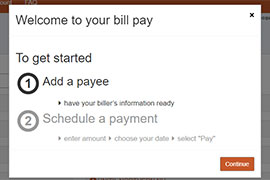
4. Enter the payment amount and the date the payment should be sent.
5. For recurring payments, select "Make it Recurring" in the payee dashboard.
6. Enter the recurring payment details such as amount, frequency and payment date.
7. Submit!
Solarity Online Banking supports the latest versions of Chrome, Safari and Microsoft Edge. We strongly recommend using the latest versions of these browsers to ensure the best and safest online banking experience, as some features may not display or work properly with outdated or unsupported browsers.
In online banking, click the "Accounts" dropdown and select "Manage eStatements."
On the mobile app, click the "Menu" option at the bottom of your screen and select "Manage eStatements."
From there, select the accounts you would like to receive eStatements.
Please note: If you don’t have access to digital banking, you will need to enroll in online banking before you sign up for eStatements.
Traveling is always an exciting time! One thing we don’t want you to worry about is access to your funds. However, traveling can cause a fraud alert on the card, which could restrict access to your funds.
The best way to avoid this is to add travel notifications to your debit card and credit card. Then, if you use your card in the location you travel to, you won’t have any issues using your funds.
You can quickly and easily add travel notifications in online banking and the mobile app under "card controls." Or give us a call at 800.347.9222.
A minimum of $275 is available immediately.
Follow these steps to view your eStatements online banking:
- In online banking, click the "Accounts" dropdown and select "View eStatements" to display the page. On the mobile app, click the "Menu" option at the bottom of your screen and select "View eStatements."
- From there, click the "Statement Date" link that you want to view.
- View the selected statement as a PDF file.
For your security, if you’re having trouble logging into your online or mobile banking account, reach out to us for assistance by calling 800.347.9222. We can unlock your account and assist you with any necessary updates to your credentials.

Still have questions?
If you aren't able to find the answers you need, reach out to us. We are happy to help!