

24/7 banking: anytime, anywhere
At Solarity, Brighter Banking is about creating a member experience that shines. That means expert guidance from people who care about your goals, smart tools that make managing your money easier and products designed with your needs in mind. From checking to savings to everyday money management, we’re here to make every banking moment brighter.


Checking
Everyday banking with convenient access to your funds


Savings
A variety of options to help you reach your savings goals


Online Banking
Pay bills, check your balance and more .... anywhere, anytime!


Home Loans
Purchasing or refinancing, we have a home loan for you


Vehicle Loans
Cars, trucks, RVs, boats, trailers, ATVs and more

Fast. Convenient. Secure.
Check your balance, transfer funds between accounts, make a payment and send money to friends. These are just a few of the many things you can do with just a few clicks of your mouse or taps on your phone. Online banking and our convenient mobile banking app put the power of managing your account right at your fingertips.*
- Online banking
- Mobile app
- Mobile deposit
- Online bill pay
Common questions about personal banking services


Follow the steps below to deposit your check using mobile deposit:
- After logging in to the mobile app, click the "Deposit" option at the bottom of your screen.
- Click the "Take photos" button at the top of the next screen.
- Using your phone or tablet's camera, snap a picture of the front and back of your check and follow the on-screen instructions to upload the photos.
- Use the "To" drop-down to select the account where you want to deposit the money.
- In the "Amount" box, enter the amount of the check you are depositing.
- Click "Continue" to complete the mobile deposit
Download our app in the App Store® or Google Play™ store.
Follow these steps to send money to another member in online banking or the mobile app:
- In online banking, locate "Transfers & Payments" in the main navigation and select "Make a Transfer" from the dropdown. In the mobile app, select "Transfer" in the bottom menu. From here, select the "To another member" option.
- In the "From" dropdown, select the account where the funds will be coming from.
- In the "To" dropdown, select the member you would like to receive the funds.
- Click the "+Add a new payee" option if you don't already have another member account saved.
- Provide the payee's account number, last name and a nickname (optional).
- After the payee has been selected, enter the payment amount and when you would like the money to be sent. You also have the option to enter a transaction memo for your records.
- Select "Transfer." Review your transfer info to make sure it is correct, and select "Confirm Transfer."
Our routing number is 325183738. Additionally, you can find the routing number followed by your full 14-digit account number on the bottom of your checks. If you do not have checks and need to know your account number, give us a call at 800.347.9222.
Get more from your membership

Home Loans
We'll help you find the perfect loan, whether it's for an upsize, downsize, first home or refinance.
Find your home loan
RV Loans
Whether you're glamping in a motor home or camper, we've got loans for every type of RV.
Let's go
Credit Cards
Whether you have a long credit history or are looking for a fresh start, we have a card for you.
Spend with ease
Helpful articles and information

Solarity Credit Union honored with Selah Community Pride Award
We’re honored to receive a Community Pride Award from the City of Selah, recognizing our commitment to the Selah community.
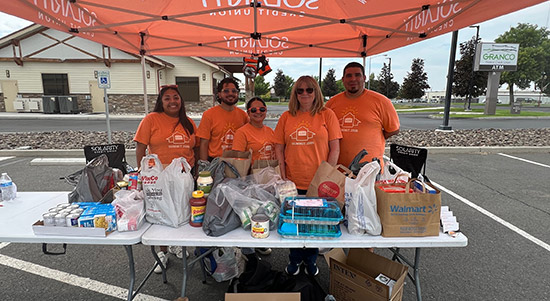
Solarity and Moses Lake team up for Shred Day and Food Drive
Fifty vehicles. Nearly a full shred truck. 372 pounds of food donations. That’s what happens when the Moses Lake community comes together to protect personal information.

What is loud budgeting?
Loud budgeting is a personal finance trend that encourages you to be open about your financial goals and confident about the choices you make with your money.
Message and data rates may apply depending on your cell phone plan. Please contact your wireless carrier for more information.